Lake Martin Voice Realty
Go Mobile For A Lake Martin Home Search
I have made a change to Lake Martin Voice.com for mobile users that I think will make it easier to search for a waterfront home, lot, or condo.
Most users probably won’t notice or care, but I explain here because I want to draw attention to my new mobile search for Lake Martin real estate. Previously, I had a WordPress Plugin that would kick in when you accessed my site from an iPhone, Droid, etc. The result was that the mobile version of my site did not look like the regular. It categorized and summarized the articles and made reading my posts much more easy from a smart phone.
However, I have changed my mind on that. I think that many mobile users of my site are more likely to be searching the Lake Martin MLS. I decided to optimize the mobile experience for the best search possible.
Enter FBS Data Systems’ new Mobile Search.
FBS sells a product called FlexMLS. FlexMLS is the software that the Lake Martin Area Association of Realtors uses for its MLS system. I really love FlexMLS. I have looked at a lot of other MLS software, and even dabble in another association’s, but I have yet to find a better overall MLS software system than FlexMLS. They just seem to be out on the forefront of usable new features. I like a company that rolls something out before I realize I need it.
FlexMLS has recently improved its mobile search for consumers (that’s you). The search is really clean, simple, and effective. I played around with the beta test and they have improved it since then. I love it.
Mobile users will still be able to read my blog posts, neighborhood pages, etc. But I make this change because it makes it easier to get to the search from a mobile browser.
I would like to make a few customizations for the Lake Martin market. For instance, I would love to have the field “Waterfront” available on the default page, and defaulted to a “Yes.” Overall, though, I am really happy with it.
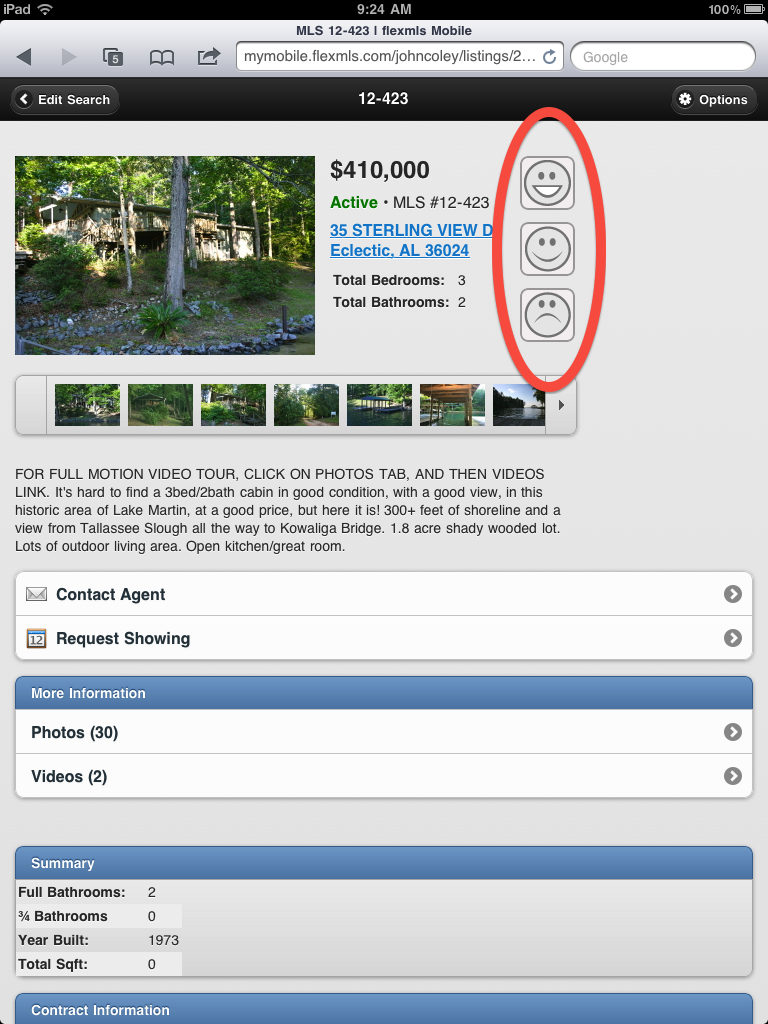
Here are some more screen shots:
![]() |
![]() |
![]() |
Once you search the Lake Martin MLS, through the mobile site or the regular version, if you see something you like, just click the smiley face next to it. That will allow you to register for your own “portal” to login to the system. Don’t worry, your info only comes to me.
If you have your own login, you can save your likes, dislikes, and “I’ll buy this one when I win the lottery” home.
Or, just contact me here or call me at 334 221 5862 or email me at [email protected] and let me search for you.
Lake Martin Voice Announces Map Based MLS Search
Lake Martin Voice readers have noticed this for a while now, but we have recently undergone a redesign. I did this to try and keep my blog on the positive tip of usability and reader friendliness, without indulging myself in a bunch of geeky add ons that distract.
That being said, by far the most popular element of the redesign as been the new way to search the Lake Martin MLS.
Coley Real Estate is proud to offer the area’s only (so far as I know) Map Based MLS search. Just click on the Search the MLS tab above to see what I mean.
When you do that, you will be taken to a search portal. You may have to adjust the up/down and right/left scroll bars on your screen to remove my smiling face and see the map. You will see that the map shows you the total number of active listings and asks you if you want to plot them (at this writing there were 1,335).
If you don’t want to see them all, narrow your results by # of bedrooms, or price, or waterfront, on the left. Now is when it gets interesting, so let’s use the map to restrict the results:
1. Zoom in to your desired level. You can move the map around by clicking in it and dragging around to get in the perfect location.
2. Select a map drawing tool from the bottom, I like the “irregular polygon” tool. See this pic to find the tool:
3. Click around the area that you want to, with this tool you can make as many clicks as you want. The circle tool is different, and so is the rectangle tool. When you are done defining your area, double click to set it in stone. Then it looks like:
4. View the results. If it doesn’t do this automatically, click “Update” so that the number count is refreshed. You can view individual listings by zooming in and clicking on each green square, or you can view them all in a list by selecting the “List” tab on the upper right corner.
5. Enjoy! If you have any interest in any of the listings, contact me – you call or email me at my info at the top of the page. If you have trouble browsing around – email me, I will try to help.
FAQ about the Lake Martin Voice MLS Map Search:
1. Are you cool or something? How do you have this info and no one else does? I would like to pretend that I am cool, but in reality I am not. This is the same info that is presented by the Lake Martin Area Association of Realtors, and by many other realtors’ sites, for that matter. The big difference is that here, for the first time, it is presented and organized by each listing’s geocode so that you can see it on a map. The #1 complaint I heard from consumers was that our MLS is hard to search. This is an attempt to help that problem. A huge thanks to Flex MLS for putting out a great software system for us to use.
2. Where is my (my neighbor’s) waterfront home on the map? I know for a fact it’s for sale, I can see the sign from my window, but it’s not on your map. What’s up? Keep in mind that this data is a direct feed from the MLS. If the listing agent has not gone into the system to correctly tell FlexMLS where the listing is, it may be wrong. Much like if the listing agent enters the wrong number of bedrooms, it will be wrong until each listing agent fixes it. Nothing I can do about that (unless it’s my listing). The system is imperfect as it is fed data by imperfect people.
3. So what should I do if my home is for sale and it’s wrong on your map? Well, a.) it’s not my map, it’s info taken from the MLS. So that means it’s wrong on the MLS. I would say you should b.) call your listing agent and ask him / her to correct it.
4. I want to know of any homes that come up for sale in a certain area, yet I am too busy to check the MLS every day. Is there some way I can set up a search to automatically notify me of that? Yes, just email me and let me know of the exact borders of your desired area (e.g. Kowaliga Bridge to Chimney Rock on the south) and I will plug it into a search. It will email you when there is a change in that area. It’s totally free of charge and of guilt. I only hope that you will call me to help you when the time comes.
5. Are these all your listings? Nope, I wish. This data is pulling from the entire Lake Martin Multiple Listings Service. My listings are included, but so are everyone else’s. But, I CAN help you with all of these. If you are interested in anything you see, contact me, I can help you research or buy something, and it doesn’t cost you a dime more.
6. Where is a summary of your listings? Two places – you can click here for a map version and here for a list of my listings.
7. Would you like to know how to improve this? Yes I would! Please let me know how I can make it better!